
Proof, not a checkbox
A habit tracker that asks for a photo
Habit trackers usually trust you. You tap a circle, the streak increments, and nobody asks what you actually did. That design is fine if you are honest with a checkbox. It is useless if the checkbox is how you lie to yourself. Mad AI: Angry Alarms is a habit tracker with photo proof: the completion action is a picture, and an automated check compares that picture to the goal you wrote.
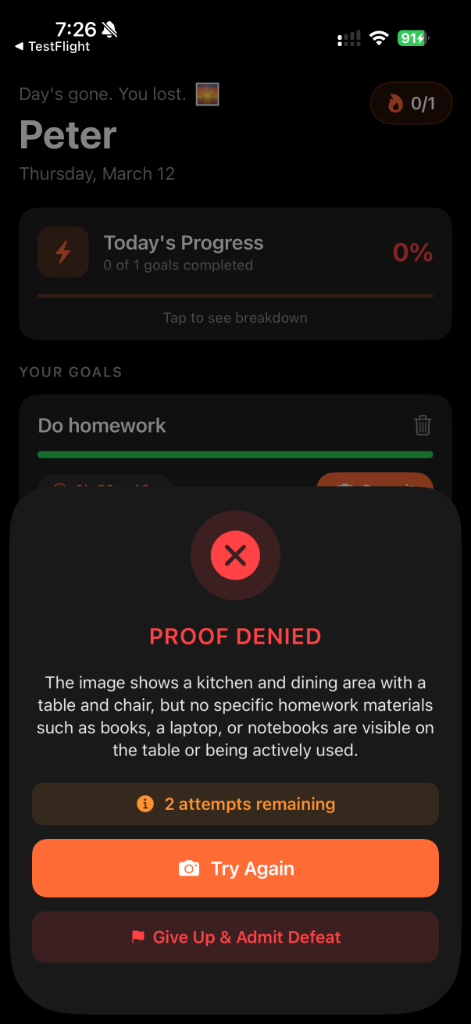
This is not a claim that Mad AI is the only app on earth that can accept a photo. It is a claim about this product’s loop. You set a deadline. You get reminders. You prove the habit with a camera, not a toggle. If the photo is the wrong scene — a kitchen submitted as homework, an empty hallway submitted as a gym visit — the proof can be denied and the reminders keep going.
Use it for habits you can show: a workout floor, a desk with notes, a sink that is actually empty. Do not use it for private or sensitive scenes. The Privacy Policy covers storage and processing of uploads. This page does not add extra promises about encryption, human review, or a perfect match rate.
Why a photo changes the habit
A checkbox is frictionless, which is why people fake it. A photo is slower and slightly embarrassing, which is why it is harder to fake in the same way. You can still stage a picture. The app can still get a check wrong. The point is to make “done” mean “I produced evidence,” not “I tapped a pixel.”
What the Prove it button is for
On the goals screen, an active task can show a countdown and a Prove it control. That is the upload path. After you submit, you either get completion or a denial with a reason in the app, plus remaining attempts when the check fails. That UI is the habit mechanic. It is not a social network.
Questions
Can I complete a habit without a photo?
The product is built around proof uploads. If you want a tracker that believes a tap, this is the wrong habit app.
Does the AI always get the photo right?
No, and this site will not pretend otherwise. A denied proof means the automated check did not match your goal text. You can retry or stop the goal. Details of processing are in the Privacy Policy.