
The loop
How Mad AI: Angry Alarms works
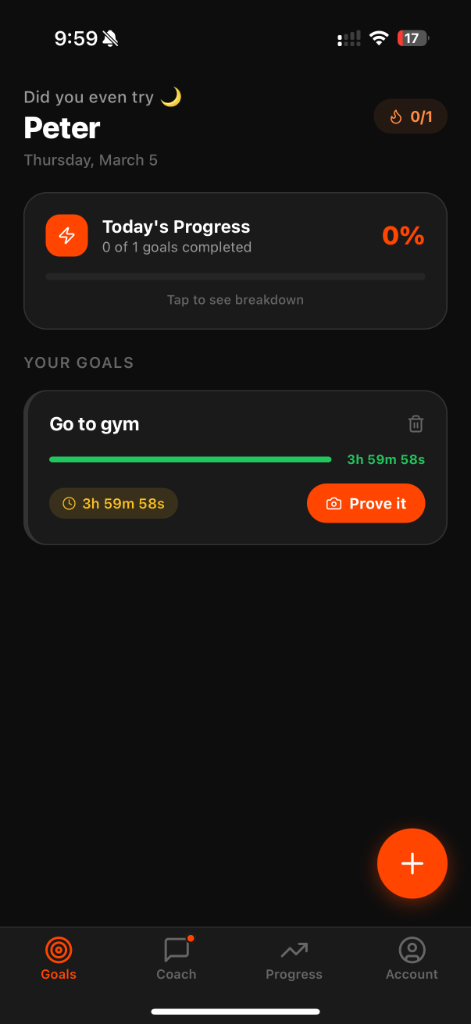
Mad AI: Angry Alarms is an iPhone and iPad app with a simple loop: you write a goal, you attach a deadline, you get reminders, you upload a photo, and the app checks whether that photo matches what you said you would do. If the check fails or the deadline passes, alarms and notifications keep going until you finish or you stop the goal.
That is the whole product. There is no silent checkbox that lets a missed day disappear. The pressure is the point. The App Store listing names the app Mad AI: Angry Alarms and uses the subtitle “Lock in or get annoyed.” This page is the mechanics, not a ranking.
Friend invitations and a public leaderboard are not offered in the current app. This site does not describe those features as shipping.
1. Write the goal
You create a task in plain language: go to the gym, finish a problem set, sit down and write. The text you enter is what the later photo is checked against. Vague goals make that check harder. Specific goals make it obvious what the picture should contain.
2. Attach a deadline
The clock is part of the goal, not a calendar decoration. When time is running, the app can send reminders before the cutoff and alarms after. You are not relying on a streak freeze or a “skip today” button to stay comfortable.
3. Reminders, then alarms
If you ignore the first ping, more follow. App Store reviews that mention alarms and notifications are user opinions about that follow-up, not a laboratory study. You can still mute system notifications in iOS settings; doing that removes the pressure the product is built around.
4. Photo proof
When you claim the goal is done, you take a picture. The goals screen puts a Prove it control on the task. The picture is resized, stripped of EXIF/GPS, and sent for a one-time automated check. It is not kept on our servers. This site does not add extra guarantees about accuracy beyond the Privacy Policy.
5. The check, and the miss path
If the image looks like the goal, the task can close. If it does not — for example a kitchen table submitted as homework proof — the app can deny the proof and leave attempts remaining, or you can give up on that goal. Missing is allowed. Pretending you finished without a matching photo is the thing the loop is designed to make expensive.
Questions
Do I have to use photo proof?
Completing a goal in Mad AI is built around uploading a picture the app can check. That is the difference from tapping done.
What happens if a photo is rejected?
You can try again while attempts remain, or stop the goal. Rejection means the image did not match the goal text closely enough for the automated check — not that you are a bad person.
App Store reviews
4.8 ★ on the App Store
Based on 51 ratings
5 out of 5 stars
great app
the app has been super helpful. ive tried other productivity apps and none of them really hold you accountable. this one does though its impossible to ignore all the alarms and notifications. i love it
kingson s
App Store review
Mar 26, 2026
5 out of 5 stars
This is the best productivity and goals app
I find myself struggling to get the motivation to go to the gym and do my school work. I have tried some of the other productivity and planner apps and none of them really worked for me and they would always try and make you pay after clicking through like 50 screens. Not only do this app have the easiest sign up process but it also doesn’t make you pay. You can actually use the app and see if it works for you. On top of that it actually has made me more productive. Honestly the app is super annoying and mean but it’s making me go to the gym more lol. I set a simple 1 hour goal to go to the gym and then my alarm went off and I snoozed it. Like 5 seconds later nonstop notifications, like legit non stop. I actually got up and went to the gym just to get it to stop. Great app.
Markkyyy111
App Store review
Mar 31, 2026
5 out of 5 stars
Productive App
This app actually does what most productivity apps promise but never deliver. Once you set a task, there’s no just ignoring it and moving on with your day it keeps reminding you until you get it done. I tried setting a simple one-hour workout, and the constant notifications made it way harder to procrastinate than to just finish it. It’s a bit intense, but honestly, that’s what makes it work. Would highly recommend🔥
1CashVVS
App Store review
Mar 23, 2026